
Shop tip
Laser and CNC Shop Safety
What to know before you run a laser cutter or CNC router at home: materials you must never laser, why you never walk away, ventilation, fire extinguishers, laser-rated eyewear, and CNC workholding, dust, hearing protection, and the e-stop.
Made in my shop
- Reading time
- About 7 min
Swipe sideways to see the whole diagram, or tap it to open full size.
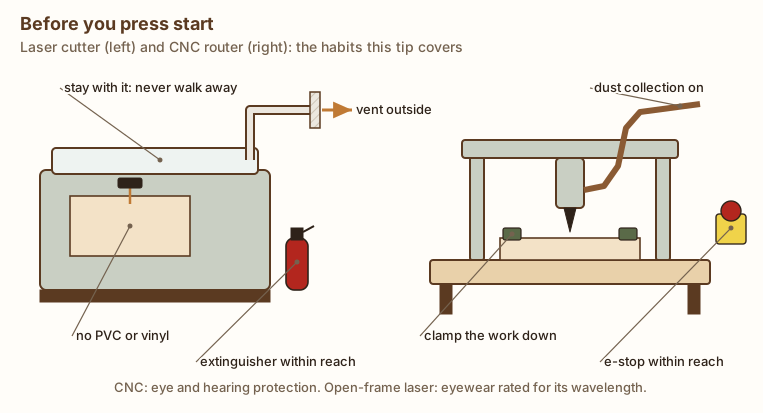
A laser cutter and a CNC router both work on their own once you press start, which makes it tempting to treat them like printers. They aren’t. A laser is a fire starter that also makes smoke you shouldn’t breathe, and a CNC router is a spinning cutter moving under computer control with a lot of force behind it. The rules below come from university safety offices, OSHA, and machine makers’ manuals (sources at the end). Your machine’s manual comes first. Where it’s stricter or more specific than this page, follow it.
Laser cutters and engravers
Know what you can’t cut
Some materials make toxic or corrosive gases when a laser burns them. The big one:
- Never laser PVC or vinyl. University safety offices prohibit PVC and other chlorinated plastics. MIT’s EHS office says PVC produces hydrogen chloride gas, which is “extremely dangerous” and corrodes the machine’s optics. The University of Illinois lists PVC and vinyl as able to emit chlorine gas and corrode the machine. Faux leather, vinyl decals, and some plastic sheets are vinyl, so if you don’t know what a material is, don’t cut it.
- Avoid polycarbonate (Lexan) and ABS. Illinois says thick polycarbonate cuts very poorly, discolors, and may ignite, and that ABS emits cyanide gas, melts, and has a high chance of igniting. MIT notes polycarbonate cuts poorly and makes soot. Carnegie Mellon’s guideline lists benzene, toluene, and other hazardous compounds among the emissions from cutting polycarbonate.
- Be careful with everyday materials too. Carnegie Mellon’s table lists soot, benzene, formaldehyde, and acrolein among the emissions from cutting wood, including MDF and plywood, and MIT reports that foam core has been involved in laser-cutter fires. Wood smoke is still smoke.
When in doubt, look up the material’s safety data sheet and your laser maker’s material list, and skip anything you can’t identify.
Never leave it running
MIT, Tulane, and Carnegie Mellon all say the same thing: never leave an operating laser cutter unattended. Stay where you can see the cut, and be ready to stop the job (pause or open the lid, per your manual) at the first flame that doesn’t go out on its own. A flare-up you catch in two seconds is a non-event. One that burns for two minutes can destroy the machine and the room.
To make fires less likely:
- Use air assist if your machine has it. MIT calls it important for preventing fires.
- Vacuum the cutting bed and the inside of the machine regularly. MIT and Tulane both stress this: built-up scraps and residue catch fire.
- Keep the area around the laser free of clutter and flammable materials, and don’t set the machine on a wooden or other combustible surface (Tulane, MIT).
Keep a fire extinguisher right there
Keep a working fire extinguisher within reach of the laser, and learn how to use it before you need it. MIT’s guidance says a dry-chemical ABC extinguisher is standard, and that adding a carbon dioxide (CO2) extinguisher is an option because it’s less likely to damage the optics; Carnegie Mellon requires dry powder or CO2 extinguishers in laser areas. If a fire isn’t small and contained, get out and call 911.
Ventilate to the outside
Laser fumes need to go somewhere other than your lungs. Use the exhaust or filtration your laser maker specifies, keep the ducting clear, change filters on schedule, and don’t run the laser if the exhaust isn’t working (Illinois, Tulane). Illinois adds that exhaust shouldn’t be routed into occupied areas. A fan in an open window is not the same as a sealed duct.
Eye protection must match your laser
An enclosed laser cutter with a closed lid and working interlocks keeps the beam inside, which is why Tulane’s safety office notes laser cutters are classified as Class 1 systems: engineering controls keep the beam enclosed. The laser inside is usually Class 3B or Class 4, which Tulane says can cause serious eye damage and skin burns without those controls. Never defeat the interlocks or run with the lid open.
Many hobby diode engravers are open-frame, with no enclosure at all. Then everyone in the room needs laser safety eyewear rated for that laser’s wavelength, with an optical density (OD) high enough for its power. That’s how OSHA’s rule puts it: laser safety goggles must “protect for the specific wavelength of the laser and be of optical density (O.D.) adequate for the energy involved.” Sunglasses and ordinary safety glasses don’t do this. Find your laser’s wavelength in its manual (OSHA notes CO2 lasers emit at 10.6 micrometers, in the far infrared; diode lasers are much shorter wavelengths) and buy eyewear whose label lists that wavelength and an OD. Keep pets and kids out of the room while an open laser runs.
CNC routers
Secure the workpiece
A part that comes loose under a spinning end mill gets thrown or wrecks the bit. Carbide 3D’s manual for its Shapeoko machines says to secure the workpiece to the work surface “using a technique appropriate to the material” before every job. Common methods include clamps, screws into a sacrificial spoilboard, a vise, and tape-and-glue for thin, light parts. Plan your toolpaths so the cutter can’t hit a clamp, and use tabs so cut-out parts stay attached until you’re done.
Stay out of the work area and never walk away
Carbide 3D’s safety rules: never reach into the machine’s working envelope while it’s running, make sure clothing, hair, and jewelry can’t get caught, handle end mills carefully (they’re sharp), and never leave the machine running unattended. Turn off and lock out the spindle or router before changing bits or making adjustments.
Know where the e-stop is
Before the first cut, find your machine’s emergency stop and make sure you can reach it without leaning over the machine. On Carbide 3D’s HDM, pressing the e-stop cuts power to the machine; the manual notes it isn’t meant to be used as an on/off switch. If your machine doesn’t have an e-stop within reach, add a switch that cuts power to the whole machine, or at least know exactly which switch does. Then practice reaching it.
Control the dust
CNC routers make a lot of fine dust and chips. Carbide 3D says to wear a respirator or mask suited to the dust from the material you’re cutting, and to arrange dust collection and ventilation if needed. A dust boot connected to a shop vacuum or dust collector catches most of it at the source. Carbide 3D also warns that sawdust poses a spontaneous-combustion hazard, so empty collectors and dispose of debris safely. See our Shop Safety Essentials for more on wood dust.
Protect your hearing and your eyes
A router spindle cutting hardwood is loud for a long time. Carbide 3D says to always wear earplugs or earmuffs, and for long jobs, maybe both, because “hearing damage is cumulative and irreversible.” Wear impact-resistant safety glasses or goggles too: chips and broken bits fly.
Before every job (a short checklist)
- Material is identified and safe to cut (laser: no PVC, vinyl, or unknown plastics).
- Exhaust or dust collection is on and working.
- Workpiece is secure; clamps are out of the toolpath (CNC).
- Bed and machine interior are clean (laser).
- Fire extinguisher is within reach (laser) and you know where the e-stop is (CNC).
- Eye and hearing protection are on, and the eyewear matches the laser’s wavelength if the beam isn’t enclosed.
- You’re staying with the machine until the job is done.
Related: Using a Router Safely and Effectively covers handheld and table routing.
Sources & further reading
- MIT EHS — Laser cutter safety and MIT EHS laser cutter guidance (PDF) (PVC and hydrogen chloride; never unattended; air assist; fire extinguishers; polycarbonate; foam core)
- Carnegie Mellon EHS — Laser cutter safety guideline (PDF) (emissions by material; always attended; dry powder or CO2 extinguishers; ventilation)
- University of Illinois Division of Research Safety — Laser cutters: safe use (materials not to cut, including PVC/vinyl, polycarbonate, and ABS; ventilation)
- Tulane OEHS — Laser cutters fact sheet (PDF) (Class 1 as engineered; never unattended; fire extinguisher; no chlorinated plastics; exhaust)
- OSHA Technical Manual, Section III, Chapter 6: Laser hazards (eyewear for the specific wavelength and optical density; CO2 laser wavelength)
- Carbide 3D — Machine safety and Shapeoko HDM manual (eye, hearing, and respiratory protection; never unattended; securing the workpiece; e-stop; dust disposal)
Right tool for the job: Do you need air assist for laser engraving? · What should you put under a laser engraver? · Which V-bit should you use for CNC signs: 60° or 90°? · Which CNC router bits should you buy first? · What free software can you use with a laser engraver? · What free software do you need to run a hobby CNC router? · How should you deal with smoke from a laser engraver? · Diode or CO2 laser for wood: which kind should you get?
Dust collector or shop vac? Read our guide.
Get new build ideas by email
Free build ideas and tips by email, about twice a month. We'll send a link to confirm. Our emails are sent by Kit, which tracks opens and clicks so we can see what's useful. Unsubscribe anytime. You must be 16 or older. Privacy policy.