
Right tool for the job
What free software do you need to run a hobby CNC router?
The three jobs CNC software does, and which free programs cover each one.
Safety first: read the safety notes before you use any of these.

Short answer
A hobby CNC router needs software for three jobs: drawing the design, turning it into toolpaths (G-code), and sending that G-code to the machine. Start with whatever your machine's maker supplies. For sending jobs, the independent guides we read recommend free gSender first, with free Universal Gcode Sender (UGS) as the fallback; both makers say their programs are free. For design and toolpaths, the free versions come with limits set by their makers: Carbide Create's free Core edition comes with Carbide 3D machines, Easel's free plan allows one carve or G-code export a week and leaves out V-carving, and Fusion for personal use is for home-based, non-commercial projects only, so if you sell what you make, Autodesk requires a paid Fusion subscription.
Three jobs, one to three programs
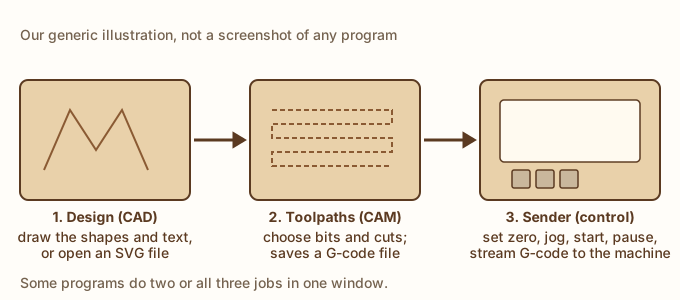
CNC software does three jobs, as CNC Dad lays out: design (CAD), toolpaths (CAM), and a sender that runs the machine. Some programs do more than one: Easel designs, makes toolpaths and can send the job to GRBL machines in a web browser (CNCSourced). Others, such as gSender and Universal Gcode Sender, only send the job, so you pair them with a design and toolpath program.
Why there’s no product pick
The independent guides we read agree on the senders: CNCRouterInfo and CNC Dad both suggest gSender first for new hobbyists, with Universal Gcode Sender as the fallback. But our rule for naming a pick is an independent hands-on test or review of the current version, and the only review we found, CNC Philosophy’s, covers UGS’s older Classic 2.0 edition, from about 2020. So we describe both as options, not picks.
Read the free-version limits
“Free” means different things here, so check each maker’s own page. Carbide 3D includes Carbide Create Core free with its own machines and says Core isn’t compatible with other CNC machines; for those, it sells Carbide Create Pro. Easel’s free plan allows one carve or G-code export a week, and V-carving needs a paid Easel Pro subscription, which renews automatically unless you cancel.
Selling what you make? Easel’s license says the service can’t be used to promote another business or commercial venture unless Easel agrees separately, so read it before you sell. We found no commercial-use limit in Carbide Create’s license (checked Oct 15, 2026), but read the current terms of any program before you use it for work you sell. See also our selling disclaimer.
For our CNC build ideas
Our CNC build ideas need toolpath software that imports SVG files and makes profile toolpaths, and the name sign also needs V-carving. Check that the free version you choose does both before you start. Before your first cut, read our Laser and CNC Shop Safety and Shop Safety Essentials tips, and see our first CNC router bits guide for staying within a bit maker’s RPM range.
Your options
Free G-code sender (machine control)
A program on the computer wired to the CNC. You load the G-code file, jog the bit into place, set zero and start, pause or stop the job, and the program streams the G-code to the machine's controller.
Good for: GRBL-based hobby routers whose maker doesn't supply its own control program, and running G-code from any toolpath program.
- gSender: free and open source (GPLv3) for grbl and grblHAL machines, per its maker, Sienci Labs, which also sells CNC machines and paid CAM software (checked Oct 15, 2026). CNCRouterInfo and CNC Dad recommend it first for new hobbyists, for its interface and its probing and tool-change helpers.
- Universal Gcode Sender (UGS): free, per its maker, and GPLv3 on its GitHub page; its maker lists GRBL, FluidNC, TinyG, g2core and Smoothieware controllers, and Windows, Mac, Linux and Raspberry Pi (checked Oct 15, 2026). CNC Dad and CNCRouterInfo treat it as the fallback if gSender doesn't suit your machine.
- We found no independent hands-on review of either program's current version. CNC Philosophy's review, from about 2020, covers UGS's older Classic 2.0 edition, which the author found easy for a newcomer to pick up (context only).
- Some machines come with their maker's own sender; CNC Dad names Carbide Motion for Shapeoko and Nomad owners.
Budget: gSender and UGS are free, per their makers' pages (checked Oct 15, 2026). UGS's maker asks for optional donations.
Design and toolpath software (CAD/CAM)
A program where you draw the design or open an SVG file, choose bits and cuts (profiles, pockets, V-carving), and save the G-code file the sender runs. Some also send the job themselves.
Good for: Every CNC job. Our CNC build ideas need one that imports SVG files and makes profile and V-carve toolpaths.
- Carbide Create: Carbide 3D says its Core edition, which includes V-carving, comes free with every Carbide 3D machine (Shapeoko and Nomad) and isn't compatible with other CNC machines. For other machines it sells Carbide Create Pro, which saves standard G-code for any CNC machine and has a 14-day free trial. Its buy page lists Pro at $120 a year (a subscription the page says renews annually and stops working at the end of its term) or $360 for a perpetual license with a year of updates (checked Oct 15, 2026). CNC Dad's February 2026 guide says Carbide Create works free with any machine, but Carbide 3D's current pages say otherwise, so go by the maker's page.
- Easel: runs in a web browser and can send jobs to GRBL machines itself (CNCSourced; CNC Dad). Easel's plans page says the free plan allows one carve or G-code export a week, and V-carving and 3D carving need Easel Pro, at $24 a month, $216 a year or $599 for three years. All Easel subscriptions renew automatically unless canceled, and tax may be added (page updated Aug 14, 2026; checked Oct 15, 2026).
- Fusion for personal use is free only for non-commercial projects under $1,000 a year, so it isn't for pieces you sell (Autodesk, checked Oct 15, 2026). CNC Dad calls Fusion the "most powerful free option" but with a steep learning curve.
Budget: It depends on the program and your machine: see each maker's terms above (checked Oct 15, 2026). If you sell what you make, read each program's terms first.
Your CNC maker's own software
Software from the company that made your machine, set up for its controller.
Good for: Machines that ship with it, such as Carbide 3D's Shapeoko and Nomad (Carbide Create Core, per Carbide 3D; Carbide Motion, per CNC Dad) or Inventables' machines with Easel (CNCSourced).
- CNC Dad suggests using whatever came with your machine for the first few weeks, since its maker chose it to work with that machine.
- What's free can depend on owning that maker's machine: Carbide 3D's free Create Core comes with its own machines (checked Oct 15, 2026).
Budget: Check your machine maker's own page for what's included.
What we'd start with
The software your machine's maker supplies or names in the manual. CNC Dad suggests starting with what came with your machine, since its maker chose it for that machine. If your machine came with design software but no sender, add a free one.
A free sender such as gSender, or UGS if gSender doesn't support your controller. Both are free, per their makers. CNCRouterInfo and CNC Dad recommend gSender for new hobbyists and UGS as the fallback; UGS's maker lists more controller types.
Choose design and toolpath software by what your projects need, and read its free-version limits. Our name sign build idea needs V-carving, which Easel's free plan leaves out. Carbide Create's free Core edition comes with Carbide 3D machines (makers' pages, checked Oct 15, 2026).
Sources
- CNC Dad: Best free CNC software for beginners (2026) (external site, opens in a new tab) (independent guide, February 2, 2026; last verified February 2026; checked October 15, 2026): A beginner's guide built from community threads, retailer listings and the site's own machines. It suggests Carbide Create first for design and toolpaths, Easel for the easiest start and Fusion for personal use later, with gSender as its first-choice sender and UGS as the fallback. Its claim that Carbide Create is free for any machine differs from Carbide 3D's current pages, and its line that Fusion for personal use is free for hobbyists earning under $1,000 a year from their projects leaves out Autodesk's non-commercial rule. The site uses Amazon Associates affiliate links; the program links on this page are plain.
- CNCRouterInfo: gSender vs UGS vs CNCjs (external site, opens in a new tab) (independent guide, updated October 2026; checked October 15, 2026): Compares free G-code senders. It recommends gSender for new hobbyists for its interface, probing wizards and tool-change support, and UGS as the alternative if it supports your controller. The site uses Amazon and AliExpress affiliate links (Amazon Associates); we found none on this page.
- CNCSourced: Free CNC software (CAD, CAM, control and firmware) (external site, opens in a new tab) (independent guide, May 3, 2023; updated February 13, 2024; checked October 15, 2026): A roundup by an author who describes his own use of the programs. It calls Easel a free all-in-one program for simple 2D and 2.5D work, with paid extras in Easel Pro, lists UGS among free control programs, and notes that Fusion's free version can't be used commercially. The site has an affiliate disclaimer, and this page carries an xTool referral link.
- LinuxLinks: Universal Gcode Sender (external site, opens in a new tab) (independent guide, November 4, 2023; updated October 4, 2026; checked October 15, 2026): A software directory entry by Steve Emms: free and open source (GPLv3), works with GRBL, TinyG, g2core and Smoothieware controllers, with a 3D G-code view. We found no affiliate links on this page.
- LinuxLinks: gSender (external site, opens in a new tab) (independent guide, April 27, 2024; updated October 4, 2026; checked October 15, 2026): A software directory entry: free and open source (GPLv3) from Sienci Labs, for Grbl and grblHAL controllers, with probing, calibration, tool-change and surfacing tools, and it can resume a job from a chosen line. We found no affiliate links on this page.
- MakeUseOf: Universal G-Code Sender, what you need to know (external site, opens in a new tab) (independent guide, October 30, 2022; checked October 15, 2026): A how-to with the author's own screenshots: choose the firmware and port to connect, open a G-code file, check it in the visualizer and send commands. Says UGS is free and open source for Windows, Mac and Linux. We found no affiliate links on this page.
- CNC Philosophy: Universal Gcode Sender review (older Classic 2.0 edition, about 2020) (external site, opens in a new tab) (independent review, no date shown (its screenshots are dated June 2020); checked October 15, 2026): Context only: a hands-on review from about 2020 of the older UGS Classic 2.0 edition on a small 3018 engraver, which the author found easy for a newcomer to pick up; it needed Java installed. It doesn't cover the current UGS Platform edition. The site uses Amazon Associates affiliate links and an affiliate link to SourceCAD courses.
- Universal Gcode Sender (maker's site) (external site, opens in a new tab) (maker spec page, no date shown; checked October 15, 2026): Calls UGS free software for the hobby CNC community and asks for optional donations. Lists GRBL, FluidNC, TinyG, g2core and Smoothieware controllers, Windows, Mac, Linux and Raspberry Pi, a 3D G-code view and a built-in designer that imports SVG, DXF, PNG and JPG.
- Universal Gcode Sender on GitHub (maker's page) (external site, opens in a new tab) (maker spec page, latest release 2.1.27, September 10, 2026; checked October 15, 2026): The maker's code page: GPL-3.0 license; the latest release when we checked was 2.1.27.
- Sienci Labs: gSender (maker's page) (external site, opens in a new tab) (maker spec page, no date shown; checked October 15, 2026): Says gSender is free, licensed under GPLv3, supports grbl and grblHAL machines over USB or Ethernet, and has downloads for Windows, Mac, Linux and Raspberry Pi. Sienci Labs also sells CNC machines and paid CAM software on the same site.
- Sienci Labs: Using gSender (external site, opens in a new tab) (maker spec page, July 1, 2021; updated September 28, 2026; checked October 15, 2026): The maker's manual: gSender warns about G-code lines that look wrong and, on machines with limit switches and soft limits on, about files that may exceed the cutting area; the maker says it can't guarantee to handle everything. Its Outline button moves the machine around the job's rough outline before cutting. It can also restart a job from a chosen line.
- Carbide 3D: Carbide Create (maker's page) (external site, opens in a new tab) (maker spec page, no date shown; checked October 15, 2026): Carbide Create Core, with 2D design, pockets, contours, V-carving and engraving, is included free with every Carbide 3D machine. Its FAQ says Core isn't compatible with other CNC machines, which need a Pro license. Carbide Create Pro adds 3D modeling, advanced toolpaths and standard G-code for any CNC machine, with a 14-day free trial.
- Carbide 3D: Buy Carbide Create Pro (maker's page) (external site, opens in a new tab) (maker spec page, no date shown; checked October 15, 2026): Carbide Create Pro is $120 a year as a subscription that renews annually and deactivates at the end of its term, or $360 for a perpetual license with a year of updates (more updates are $120 a year). It says Core is designed for Carbide 3D machines and isn't compatible with other CNC machines.
- Carbide 3D: Free CNC software for routers and mills (external site, opens in a new tab) (maker spec page, no date shown; checked October 15, 2026): A CNC maker's overview of free CNC software. It says Carbide Create is included free only with Carbide 3D machines and points owners of other machines to Carbide Create Pro, and describes Easel as a free CAD/CAM program with machine control for GRBL machines.
- Easel: plans and pricing (maker's page) (external site, opens in a new tab) (maker spec page, updated August 14, 2026; checked October 15, 2026): The free plan allows one carve or G-code export a week, with design tools, SVG import and export and automatic toolpaths. Starter is $8 a month or $72 a year. Pro, at $24 a month, $216 a year or $599 for three years, adds unlimited carves, V-carving and 3D carving. All subscriptions renew automatically unless canceled, and tax may be added.
- Autodesk: Fusion for personal use (maker's page) (external site, opens in a new tab) (maker spec page, no date shown; checked October 15, 2026): Free for qualifying users as a one-year subscription, for home-based, non-commercial projects only, and limited to individuals generating less than $1,000 USD a year, with limited CAM functionality and forum-only support. Its special terms say anyone using it for commercial projects, or generating more than $1,000 a year, must switch to a paid Fusion subscription.
- Easel: End User License Agreement (maker's page) (external site, opens in a new tab) (maker spec page, no date shown; checked October 15, 2026): The license for Easel, linked from its plans page. It says the service may not be used to promote another business or commercial venture unless separately agreed, and sets out how subscriptions renew.
- Carbide 3D: Carbide Create end user license agreement (maker's page) (external site, opens in a new tab) (maker spec page, no date shown; checked October 15, 2026): A limited, non-exclusive license to use Carbide Create; a single-user license covers one computer at a time. We found no commercial-use limit in it.
- Carbide 3D: Machine safety (external site, opens in a new tab) (maker spec page, no date shown; checked October 15, 2026): A CNC maker's safety page: wear impact-resistant eye protection, hearing protection and a mask suited to the dust; keep clothing, hair and jewelry clear; never reach into the working area while it runs; handle end mills with care; never leave the machine running unattended.
- Carbide 3D: Shapeoko HDM 3.0 manual (external site, opens in a new tab) (maker spec page, no date shown; checked October 15, 2026): A CNC maker's manual: engage the spindle lock-out before tool changes and turn off the power before adjusting; secure the workpiece; inspect end mills before each use; the e-stop cuts the machine's power; consider fire from friction and keep an extinguisher handy.
- Sienci Labs: CNC safety fundamentals (external site, opens in a new tab) (maker spec page, January 20, 2026; checked October 15, 2026): A CNC maker's safety page: hearing and eye protection, a dust mask or respirator of at least N95, never leaving the machine unattended, keeping hands off the machine while it runs, and a warning that materials can ignite during cutting or in dust collection bins.
- Carbide 3D: Toolpath simulation (external site, opens in a new tab) (maker spec page, no date shown; checked October 15, 2026): A CNC maker's lesson on viewing toolpaths in 3D before cutting, to spot and fix common toolpath errors.
- Sienci Labs: Running jobs checklist (external site, opens in a new tab) (maker spec page, July 31, 2026; checked October 15, 2026): A CNC maker's pre-cut checklist: secure the material, install the correct bit and tighten the collet, select the work offset, set zeros that match the toolpath software, load the correct file, check the toolpath won't hit clamps and the machine can reach the depth, and check a G-code file's units (G20 inches, G21 millimeters).
- Sienci Labs: Feeds & speeds (external site, opens in a new tab) (maker spec page, May 13, 2026; checked October 15, 2026): A CNC maker's guide to feed rate, plunge rate, spindle speed, depth of cut and stepover, with starting-point tables; it warns that too high a feed rate can break a bit and too slow a feed makes it rub and overheat.
How we picked
We didn't hands-on test these. We read independent guides (CNC Dad, CNCRouterInfo, CNCSourced, LinuxLinks, MakeUseOf) and an older independent review (CNC Philosophy), plus the software makers' own pages (Universal Gcode Sender, Sienci Labs for gSender, Carbide 3D, Easel, Autodesk for Fusion) and CNC makers' safety pages (Carbide 3D, Sienci Labs). Every claim on this page comes from a source linked under Sources. We only name a product as a pick when it has at least three independent sources from at least two different outlets, each naming that exact program, including at least one independent test or review of the current version, plus the maker's own page. No program met that bar: the guides we found recommend gSender and Universal Gcode Sender, but the only hands-on review we found covers an older edition of Universal Gcode Sender. So this guide describes kinds of software and names programs only as examples. We say nothing about a program's cost or license beyond what its maker's own page said when we checked it. The page's own claims rest on at least three independent sources from at least two outlets. Links were last checked on .
No paid links. Every link on this page is a plain link: no affiliate codes or tracking, and no company paid or asked to be listed (disclosure). Links open in a new tab.
Some outlets we cite get review samples from tool makers; we don't use pieces a maker paid for or sponsored.
We pick tools from independent tests and reviews, not our own testing.