
Right tool for the job
Do you need air assist for laser engraving?
What air assist does for a laser on wood, and when you need it.
Safety first: read the safety notes before you use any of these.

Short answer
For cutting wood, yes: the tests and guides we read agree that air assist gives cleaner, less charred cuts in fewer passes, and safety guidance recommends it to help prevent fires. For engraving you only need a gentle flow, mainly to keep smoke off the lens; a strong blast can push smoke onto the wood and smudge the engraving. So the useful kind is one you can turn down for engraving and up for cutting. Makers' and safety guidance list it alongside ventilation, a fire extinguisher and staying with the laser, not instead of them.
What air assist does
Air assist blows a steady stream of air through a nozzle onto the spot where the laser hits the wood. On a diode or a CO2 laser, the sources we read credit it with four things:
- Less charring and soot. It clears smoke out of the cut so it doesn’t settle on the wood (LightBurn’s documentation; Laser Crafting).
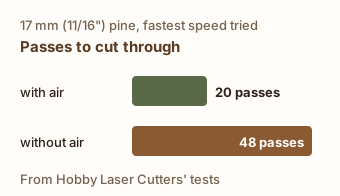
- Deeper cuts per pass. In Hobby Laser Cutters’ tests, 17 mm (11/16”) pine took 20 passes with air instead of 48 without it at the fastest speed they tried.
- Fewer flare-ups. OMTech’s settings guide says to turn on air assist when cutting plywood to cut down flare-ups, edge charring and soot. MIT’s laser-cutter safety guidance calls it important for preventing fires.
- A cleaner lens. The airflow keeps smoke from rising onto the focusing lens (Laser Crafting).
Engraving and cutting need different amounts of air
Cutting wants strong air to clear the narrow cut and keep flames down. Engraving wants only a little: enough to protect the lens, but not so much that it pushes smoke back across the surface and smudges the engraving (LaserUser, citing Russ Sadler’s tests; LightBurn forum). That’s why an air supply you can turn down is worth more than a stronger one you can’t. In LightBurn, the Air setting switches air assist on or off for each layer. For how that fits into engraving and cutting thin-wood ornaments, see laser engraving wood ornaments.

Diode and CO2 lasers
Many diode lasers don’t come with air assist, or come with only the nozzle (LightBurn’s documentation; Diode Laser Wiki). Many CO2 lasers ship with a pond-style pump, which helps but can’t be turned down for engraving (Laser Crafting). Whatever you use, keep the pump outside any enclosure, where the air is clean (Diode Laser Wiki).
Your options
Air assist that came with your laser
Some lasers ship with an air nozzle, and some with a pump as well. The Diode Laser Wiki notes that Sculpfun's S10 comes with the nozzle but not the pump, while the S30 series includes both; Laser Crafting notes that many CO2 lasers come with a pond-style air pump.
Good for: Getting started: engraving and light cutting on the machine you have.
- Nothing extra to buy, and the nozzle already fits your laser head.
- Bundled pumps vary. Laser Crafting found that pond pumps cut down scorch marks but didn't get rid of them, and that many can't be turned down for engraving.
Budget: Included with the machine. Check your laser's spec sheet or box contents for a nozzle and a pump.
Add-on nozzle and a small adjustable pump
A nozzle on the laser head fed by a small electric air pump on a hose. The pumps sold for diode lasers by Sculpfun and xTool are rated at about 30 liters per minute (Hobby Laser Cutters).
Good for: Diode lasers: engraving with a trickle of air, and occasional cutting.
- Hobby Laser Cutters' tests on three diode lasers found cleaner edges, less charring and far fewer passes when cutting with air than without.
- A flow knob lets you switch between full air for cutting and a light flow for engraving (Laser Crafting).
- Not enough air for frequent heavy cutting, Laser Crafting found.
- The nozzle must fit your laser head; check what your laser's maker sells before buying a third-party one (Diode Laser Wiki).
Budget: We don't quote a price. Laser Crafting says the adjustable diode-laser pump it tried costs slightly more than a small pond pump.
Pond or aquarium air pump
A diaphragm pump made for ponds or aquariums, run to the laser's nozzle on a hose. Many CO2 lasers ship with one (Laser Crafting).
Good for: Light engraving and cutting if you already have one.
- Laser Crafting found them loud, with a pulsing airflow that can make cuts uneven, and with no way to turn the flow down for engraving; it doesn't recommend them.
- The Diode Laser Wiki's author replaced his aquarium-style pumps with a dedicated laser pump, which he found much quieter.
Budget: Usually a little less than a pump made for lasers (Laser Crafting).
Shop compressor with a tank, regulator and water separator
A workshop air compressor with a storage tank, feeding the nozzle through a pressure regulator and a water separator.
Good for: Frequent cutting, and CO2 lasers of about 50 watts and up (Laser Crafting's suggestion).
- More air than a small pump; Laser Crafting recommends it for frequent cutting.
- Laser Crafting notes many of these compressors need rest breaks so they don't overheat.
- Needs a water separator so condensation doesn't reach the lens (Laser Crafting).
- Laser Crafting points out it can run other air tools in the shop too.
Budget: We don't quote a price: it depends on the compressor, and you may already own one.
What we'd start with
Use the air assist your laser came with. If it has none, add the nozzle your laser's maker sells and a small adjustable pump. Turn the flow down for engraving and up for cutting (LaserUser; LightBurn's forum).
An adjustable 30 L/min pump on your diode laser's nozzle. It covers engraving and occasional cutting, and the knob gives you the low flow engraving needs (Laser Crafting). Keep the pump outside any enclosure so it pulls in clean air (Diode Laser Wiki).
A shop compressor with a tank, regulator and water separator. For frequent cutting or a CO2 laser of about 50 watts and up, Laser Crafting recommends this setup over small pumps.
See Shop compressor with a tank, regulator and water separator
Sources
- Hobby Laser Cutters: Laser air assist comparison (external site, opens in a new tab) (independent test, March 4, 2024; checked October 15, 2026): Cut plywood, pine, paulownia and acrylic on three diode lasers (xTool D1 Pro, Sculpfun S10 and S9), with and without air assist, noting that Sculpfun and xTool use similar 30 L/min pumps. With air, cuts took far fewer passes (17 mm pine at their fastest speed: 20 instead of 48) and had cleaner edges and less charring. The site offers maker discount codes.
- Laser Crafting: Best air assist for lasers, three options compared (external site, opens in a new tab) (independent test, June 2, 2024; updated July 30, 2026; checked October 15, 2026): Compared a pond pump (loud, pulsing, not adjustable; not recommended), an adjustable diode-laser pump (for diode lasers up to 40W, engraving and occasional cutting) and a tank compressor (for frequent cutting and CO2 lasers of 50W and up). Says air assist clears smoke, protects the lens and helps stop flames, so even engraving should get a little air. Uses Amazon affiliate links.
- Diode Laser Wiki: Air assist (external site, opens in a new tab) (independent review, February 22, 2022; updated October 15, 2023; checked October 15, 2026): Explains how the nozzle and pump fit Sculpfun diode lasers and warns never to put the pump inside the enclosure, because dirty air harms the pump and the lens. The author switched from aquarium pumps to a dedicated laser air pump, which he found much quieter; a small fan on the laser head did far worse than a compressor in his test.
- LaserUser: Laser air assist, flow, pressure, cutting and engraving (external site, opens in a new tab) (independent guide, April 25, 2024; checked October 15, 2026): Cutting benefits from strong, well-aimed airflow to clear the cut and control flame. For engraving, citing Russ Sadler's tests, a much gentler flow protects the lens without blowing smoke residue across the surface.
- LightBurn forum: Use air assist during engraving? (external site, opens in a new tab) (independent guide, September 2023; checked October 15, 2026): Users answering a new Sculpfun owner: high-pressure air while engraving can leave a smudgy engraving, and many people run low air all the time for lens protection and high air for cutting.
- LightBurn documentation: Cut settings for beginners (external site, opens in a new tab) (maker spec page, no date shown; checked October 15, 2026): LightBurn's Air setting turns air assist on per layer. The docs say air assist can help prevent soot and charring and help cutting, and that many lasers don't come with it.
- OMTech: Laser engraving speed chart (external site, opens in a new tab) (maker spec page, updated August 18, 2026; checked October 15, 2026): A laser maker's settings guide: for cutting 3 mm plywood, turn on air assist to cut down flare-ups, edge charring and soot, and keep it steady and moderate rather than blasting it.
- xTool: Laser safety (external site, opens in a new tab) (maker spec page, no date shown; checked October 15, 2026): A laser maker's safety tips: air assist gives cleaner cuts and engraving; keep a CO2 extinguisher or fire blanket within reach; ventilate; never leave the laser running unattended.
- MIT EHS: Laser cutter safety (external site, opens in a new tab) (safety authority, no date shown; checked October 15, 2026): University safety guidance: buy a laser cutter with air assist, which it calls important for preventing fires and helpful for cleaner cuts; never leave a running laser cutter unattended, and keep a fire extinguisher nearby.
How we picked
We didn't hands-on test these. We read independent tests, reviews and guides (Hobby Laser Cutters, Laser Crafting, the Diode Laser Wiki and LaserUser), the LightBurn software documentation, makers' pages (xTool, OMTech) and university laser-safety guidance (MIT EHS). Every claim on this page comes from a source linked under Sources or under the pick. We only name a product when it has at least three independent sources from at least two different outlets, each naming that exact product, including at least one independent test or review, plus the maker's spec page. No pump met that bar yet, so this guide recommends kinds of air assist, not products. The page's own claims rest on at least three independent sources from at least two outlets. Links were last checked on .
No paid links. Every link on this page is a plain link: no affiliate codes or tracking, and no company paid or asked to be listed (disclosure). Links open in a new tab.
Some outlets we cite get review samples from tool makers; we don't use pieces a maker paid for or sponsored.
We pick tools from independent tests and reviews, not our own testing.