
Right tool for the job
What should you put under a laser engraver?
What to put under an open-frame laser, and why each layer is there.
Safety first: read the safety notes before you use any of these.
Short answer
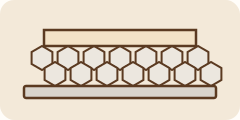
Two layers. First, something the beam can't burn through: laser makers' manuals say to run the machine on a flat, non-flammable surface with a metal sheet, such as aluminum, in the work area, and MIT's safety office says not to set a laser on wood or other combustible surfaces. Second, when you cut, something that lifts the work off that plate (a honeycomb, slats or pins) so smoke can escape underneath. In Hobby Laser Cutters' test, a part cut on a honeycomb came out much cleaner on both sides than one cut on a solid steel plate. For engraving only, the work can sit flat on the plate.
Why the base layer matters
On an open-frame laser, whatever sits under the work is next in line when the beam cuts through, and the Diode Laser Wiki notes that even an out-of-focus beam can still start a fire. Laser makers’ manuals say to run the machine on a flat, non-flammable surface (xTool) and to lay a metal sheet, such as aluminum, in the work area so the surface underneath isn’t smoked or burned (xTool). MIT’s laser-cutter safety guidance says not to set a laser cutter on wood or other combustible surfaces.
Why lift the work for cutting
When the beam cuts through, smoke and hot gas have to go somewhere. If the work lies flat on a solid plate, that smoke stains the underside of the cut parts. Hobby Laser Cutters cut the same circle on a honeycomb and on a solid steel plate, and the honeycomb part came out much cleaner on both sides. The Diode Laser Wiki explains it the same way: air assist pushes the smoke down, so the work needs space underneath. It adds that the bed itself needs air below it: a honeycomb set straight onto a smooth surface can trap fumes in its cells.

Engraving only?
For engraving, nothing goes all the way through, so the work can sit on the flat plate. A flat, rigid plate also helps keep the whole surface in focus: LaserUser swapped a thin aluminum bed for a 3 mm mild steel sheet because it was flatter and steadier.
Our laser engraving wood ornaments tip uses a flat plate for engraving and a honeycomb or pins for cutting on the same batch of ornaments.
Your options
A flat metal plate (the base layer)
A flat sheet of aluminum or steel under the material, or under whatever bed you use. xTool includes an aluminum sheet with its D1 Pro and suggests laying it in the work area before you start, to protect the desk or floor under the laser.
Good for: Every open-frame laser, as the base layer. On its own, it works for engraving only.
- Protects the desk or floor under the work area from smoke and burn marks (xTool's D1 Pro guide).
- LaserUser found a 3 mm mild steel sheet flatter and steadier than the thin aluminum bed his laser came with, which helps detailed engraving. Steel also holds magnets (Diode Laser Wiki).
- Not for cutting on its own: work lying flat on a solid plate gets soot and stains on its underside (Hobby Laser Cutters; Diode Laser Wiki).
- Maxmake's safety guide warns about shiny metal near the beam path, so see the safety box above.
Budget: We don't quote a price. Some lasers come with one (xTool's D1 Pro includes an aluminum sheet), and many honeycombs include a base plate (Diode Laser Wiki).
Honeycomb bed on the plate
A metal honeycomb grid in a frame that sits on the base plate and holds the work up off it.
Good for: Cutting wood and thin sheets, and small parts that would fall through slats.
- Smoke and soot can escape underneath, so cut parts come out cleaner (Hobby Laser Cutters' honeycomb versus solid-steel test; Diode Laser Wiki).
- Steel or iron honeycombs hold magnets; aluminum ones need pins to hold the work (Diode Laser Wiki).
- It still touches the work in many places, so it can leave marks (Diode Laser Wiki). LaserUser notes that honeycombs supplied with lasers tend to sag in the middle.
- Needs air underneath. Set straight on a smooth surface, the cells can trap fumes, and acrylic fumes can ignite at high concentration (Diode Laser Wiki).
- Scraps and residue collect in it; xTool's safety tips say to clean the work area after each project.
Budget: We don't quote a price: it depends on size and your machine. Check whether your laser's maker sells one that fits.
Slats, grids or pins
Thin metal blades (slats or lamella bars), an open grid, or pins and screws that hold the work up on a few points.
Good for: Sheet work where you want as few marks on the back as possible.
- Fewer contact points than a honeycomb, so fewer marks on the underside (Diode Laser Wiki).
- Small parts can fall through or tip and jam, and the work is harder to hold down (Diode Laser Wiki).
- LaserUser finds lamella bars suit sheet work but are harder to level.
Budget: We don't quote a price. The Diode Laser Wiki shows simple homemade versions using screws and washers in a honeycomb, rivets, or magnets.
A stainless steel rack on the plate (makeshift)
A stainless steel oven rack or pot grid set on the base plate to lift the work.
Good for: Trying cutting before you buy a bed.
- The Diode Laser Wiki says any oven rack works as long as it's stainless steel, not another alloy.
- LaserUser stresses that whatever holds the work must be rigid enough not to sag; check a rack for that before relying on it.
Budget: We don't quote a price.
What we'd start with
A metal plate under everything, and the bed your laser came with. Makers' manuals ask for a flat, non-flammable surface and a metal sheet in the work area (xTool; Maxmake). For engraving, the work can sit flat on the plate. When you start cutting, lift the work so smoke can escape underneath (Hobby Laser Cutters).
A honeycomb bed on top of the plate. It's the most common choice for cutting and holds small parts (Diode Laser Wiki). Pick steel or iron if you want to hold the work down with magnets.
Match the bed to the job. Slats or pins for sheet work, a honeycomb for small parts, and a flat steel plate for detailed engraving (Diode Laser Wiki; LaserUser).
Sources
- Hobby Laser Cutters: Air assist comparison (honeycomb section) (external site, opens in a new tab) (independent test, March 4, 2024; checked October 15, 2026): Cut a circle on a honeycomb bed and on a solid steel plate. The honeycomb part was much cleaner on both sides, and the honeycomb also kept air assist from blowing loose material away. The site uses affiliate links and sells its own honeycomb holding pins.
- Diode Laser Wiki: Laser-Unterlagen (laser beds, in German) (external site, opens in a new tab) (independent guide, January 4, 2025; updated July 5, 2026; checked October 15, 2026): Says a non-flammable base plate belongs under every bed, because even an out-of-focus beam can start a fire, and lifting the work keeps soot off its underside. Compares honeycombs (common, magnetic if steel, but many contact points; cells need venting, especially with acrylic) with grids, rivet and pin beds, magnets and stainless oven racks.
- LaserUser: Laser engraving bed (external site, opens in a new tab) (independent guide, April 25, 2024; updated October 4, 2026; checked October 15, 2026): Notes that honeycombs supplied with lasers tend to sag in the middle, lamella bars suit sheet work but are harder to level, and thin aluminum beds can have bumps and dips. The author swapped his for a 3 mm mild steel sheet, which was flatter and steadier.
- MIT EHS: Laser cutter safety (external site, opens in a new tab) (safety authority, no date shown; checked October 15, 2026): University safety guidance: don't place a laser cutter on wood or other combustible surfaces, vacuum the cutting deck regularly to help prevent fires, keep an extinguisher nearby and never leave it running unattended.
- xTool: D1 Pro quick start guide (external site, opens in a new tab) (maker spec page, updated August 14, 2025; checked October 15, 2026): A laser maker's setup guide: the D1 Pro comes with an A4 aluminum sheet, and the guide suggests placing it in the work area before a job so the desk or floor underneath isn't smoked or burned.
- xTool: Safety first for xTool F2 (external site, opens in a new tab) (maker spec page, updated May 19, 2026; checked October 15, 2026): A laser maker's safety guide: use the machine on a stable, flat, non-flammable surface, and focus correctly on highly reflective materials such as stainless steel and copper, or reflected beams can damage it.
- xTool: Honeycomb support article (external site, opens in a new tab) (maker spec page, updated February 26, 2024; checked October 15, 2026): A laser maker's support page: on a solid base, the material traps smoke and debris during cutting; a honeycomb allows air circulation, magnetic hold-down and heat dissipation.
- xTool: Laser safety tips (external site, opens in a new tab) (maker spec page, no date shown; checked October 15, 2026): A laser maker's safety tips: clean scraps and debris from the work area after each project to reduce fire risk, keep a CO2 fire extinguisher or fire blanket within reach, and never leave the laser unattended.
- Maxmake: Laser safety guide (external site, opens in a new tab) (maker spec page, no date shown; checked October 15, 2026): A laser and CNC maker's safety guide: keep highly reflective items such as metal accessories and mirror materials away from the beam path, and use a heat-resistant protective surface, such as a metal plate, so hot debris doesn't land on a wooden bench.
How we picked
We didn't hands-on test these. We read an independent test (Hobby Laser Cutters), independent guides (the Diode Laser Wiki, LaserUser) and university laser-safety guidance (MIT EHS), plus laser makers' manuals and support pages (xTool, Maxmake). Every claim on this page comes from a source linked under Sources. We only name a product when it has at least three independent sources from at least two different outlets, each naming that exact product, including at least one independent test or review, plus the maker's spec page. No bed or plate met that bar, so this guide recommends kinds of bed, not products. The page's own claims rest on at least three independent sources from at least two outlets. Links were last checked on .
No paid links. Every link on this page is a plain link: no affiliate codes or tracking, and no company paid or asked to be listed (disclosure). Links open in a new tab.
Some outlets we cite get review samples from tool makers; we don't use pieces a maker paid for or sponsored.
We pick tools from independent tests and reviews, not our own testing.